GScreenshot Lite
Better screenshots,
saved straight to Drive.
Capture tabs or crop viewport areas instantly. Annotate with premium drawing tools and sync directly to Google Drive. 100% free to use.
Better screenshots,
saved straight to Drive.
Capture tabs or crop viewport areas instantly. Annotate with premium drawing tools and sync directly to Google Drive. 100% free to use.
Get all the power of desktop screenshot tools wrapped directly into a lightweight, instant browser utility.

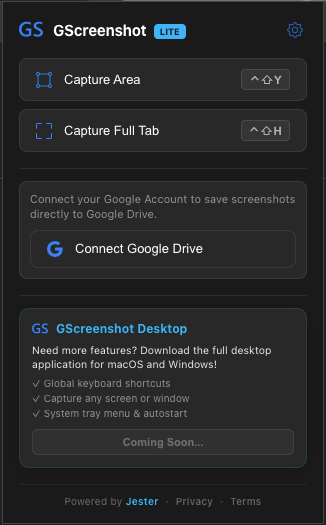
Freeze the active tab state and crop out exactly what you need with pixel-perfect resolution.

Grab a screenshot of the entire visible window viewport in a single click or keyboard hotkey.
Draw shapes, configure brush sizes, highlight parts, and add annotations instantly.

No storage limits, no links to expire. Save screenshots directly to your personal Google Drive account.
Learn why GScreenshot Lite requires specific permissions and how your data is handled.
GScreenshot Lite is a lightweight productivity tool designed to help users capture browser tab screenshots, crop specific viewport areas, and annotate screenshots with drawing tools (rectangles, arrows, text) directly within their browser.
The app is tailored for professionals, educators, and developers who need a frictionless way to capture visual feedback and save it securely without relying on third-party cloud hosting servers.
To provide a seamless saving experience, GScreenshot Lite integrates with Google Drive APIs. When you authorize the extension via the Google OAuth consent screen, the app requests the following scope:
.../auth/drive.file (View and manage Google Drive files and folders that you have
opened or created with this app): We use this scope solely to create a dedicated
"GScreenshot-Lite" folder in your Google Drive and upload your captured/edited images directly to it.
Data Privacy & Security: Because we use the restricted drive.file scope,
GScreenshot Lite has absolutely no access to any of your other existing Google Drive files, folders, or
personal data. The entire authorization process and image uploading are performed directly client-side in
your browser. No files or access tokens are ever sent to our servers.
We take security and transparency seriously. GScreenshot Lite is built entirely around direct client-side architecture.
"Privacy - Owned by You."